
A verlet integrator under 100 lines
One small physics engine runs Ragdoll, Curtain, Spider Web, Rope Bridge, and Elastic Mesh. The engine fits in 80 lines of Swift. Here's why it works.
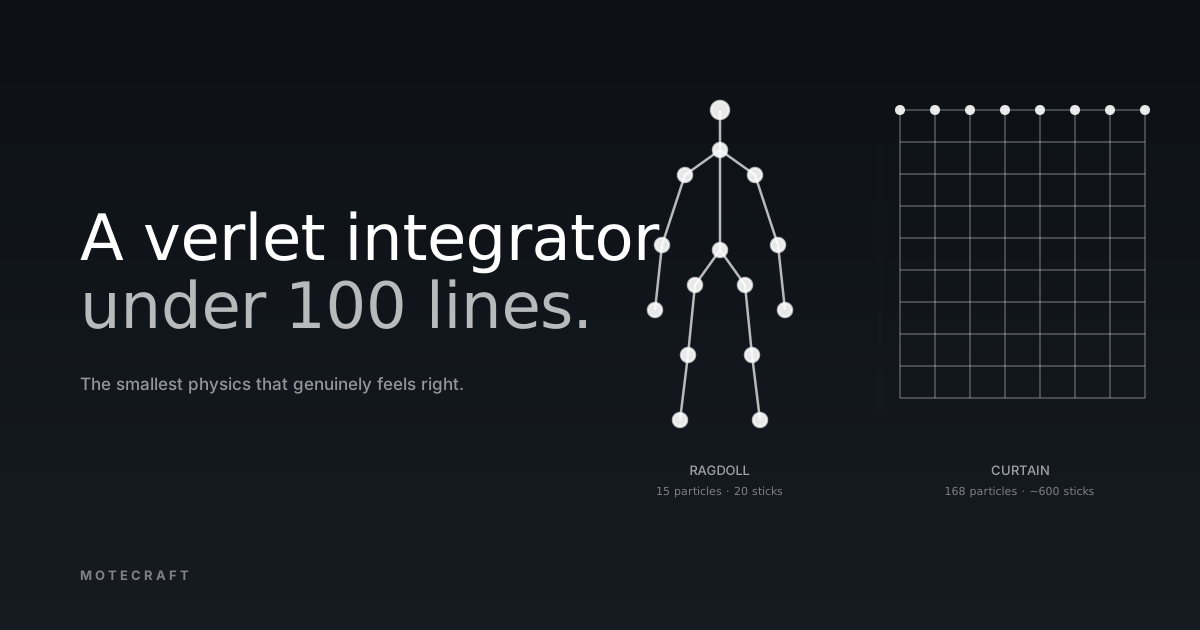
If you throw a doll at a wall in a video game and it tumbles convincingly, there's a good chance the engine doing the work is verlet integration — specifically, the position-based variant Thomas Jakobsen wrote up in his 2001 paper Advanced Character Physics. That paper is responsible for an entire generation of cloth, ropes, hair, and ragdolls in games. It's also the smallest physics that genuinely feels right for visual simulation. The whole engine — integrator, constraints, the gesture binding that lets a finger drag a particle around — fits in under 100 lines of Swift.
I'm going to walk through it because Motecraft uses one engine for five different experiences (Ragdoll, Curtain, Spider Web, Rope Bridge, Elastic Mesh), and the engine is small enough that you should be able to read the whole thing, in this post, without scrolling past your patience.
What verlet integration actually is
The classical way to advance a physics simulation by one timestep looks like this:
position += velocity * dt
velocity += acceleration * dt
You store position and velocity for each particle. Apply forces, integrate twice. Done.
Verlet does it differently. There's no velocity variable. Instead, each particle stores its previous position, and the integration step computes new position from current and previous:
new = current + (current - previous) + acceleration * dt²
previous = current
Velocity is implicit — it's the gap between previous and current. If you want a particle to keep moving in the direction it was moving, you don't have to do anything; the gap carries the motion forward. If you want to stop it, you set its previous position equal to its current. The next step's gap is zero. No velocity needs to be zeroed.
This sounds like a parlour trick. It's not. The trade-off it buys you is the entire reason the technique works.
◆ Euler vs verlet — same motion, different state
The integration step
Here's the entire integrator. Eight lines.
struct Particle {
  var p: CGPoint
  var pp: CGPoint
  var pinned: Bool = false
}

func integrate(dt: CGFloat, gravity: CGVector) {
  for i in particles.indices where !particles[i].pinned {
    let cur = particles[i].p
    let vel = CGVector(dx: cur.x - particles[i].pp.x,
                       dy: cur.y - particles[i].pp.y)
    particles[i].pp = cur
    particles[i].p.x = cur.x + vel.dx + gravity.dx * dt * dt
    particles[i].p.y = cur.y + vel.dy + gravity.dy * dt * dt
  }
}
That's a free-fall simulation. Drop a particle, it accelerates, it keeps accelerating. No collision, no rope, no ragdoll yet. But it's stable for as long as you'd like to run it, because there's no velocity term to accumulate floating-point drift.
Constraints, the part that does the actual work
The magic isn't in the integrator. It's in constraints.
A constraint is a relationship two particles must satisfy. The simplest
useful one is the distance constraint: particles A and B must be exactly
rest apart. If they're not — too close, too far — the constraint fixes
them. Verlet handles this by moving the positions directly, half on
each particle, no force calculation:
struct Stick {
  let a: Int        // particle index
  let b: Int        // particle index
  let rest: CGFloat
}

func relaxStick(_ s: Stick) {
  let pa = particles[s.a].p
  let pb = particles[s.b].p
  let dx = pb.x - pa.x
  let dy = pb.y - pa.y
  let dist = sqrt(dx * dx + dy * dy)
  guard dist > 0.0001 else { return }
  let diff = (dist - s.rest) / dist * 0.5
  let mx = dx * diff
  let my = dy * diff
  if !particles[s.a].pinned {
    particles[s.a].p.x += mx
    particles[s.a].p.y += my
  }
  if !particles[s.b].pinned {
    particles[s.b].p.x -= mx
    particles[s.b].p.y -= my
  }
}
One pass over every stick is rarely enough — fixing one stick usually breaks another. So you iterate. Four to eight passes per frame is the sweet spot for what Jakobsen called the "looks right" zone.
◆ Constraint relaxation, four iterations
Why not spring-mass-damper?
The classical alternative is to model each constraint as a spring with a
damper: F = -k(distance - rest) - c * velocity_along_axis. You sum
forces on each particle, integrate using Euler or RK4, repeat.
This is the textbook approach. It is also genuinely painful to make look like cloth.
The problem is stiffness. A spring with low k feels rubbery —
particles bounce around their constraint, the cloth has visible jiggle.
A spring with high k — the kind you need for "this feels like silk,
not a trampoline" — requires a tiny timestep to remain stable. At 60fps
with dt = 16ms, a stiff cloth simulation will blow up within a second.
Either the system explodes outward or it oscillates into noise.
You can fix that with implicit integration. Implicit integration is a matrix solve. You're now linking the cloth mesh into a sparse system of equations and solving it per frame. The performance and complexity are no longer in the "two-evening project" category. Game engines that ship cloth via SMD all pay this cost.
Verlet sidesteps the entire question. Constraints move positions directly, so they consume their own velocity automatically. There's no SMD to integrate, no stiffness parameter, no oscillation. The cost of "stiffer" is just more iterations — six passes instead of four. The numerical scheme stays stable at any stiffness because there's no springy term to amplify.
The trade-off is honesty. Verlet doesn't model real springs. The visual physics it produces are physics-shaped without being physics- true. For a calm visual app where the goal is "feels like cloth", that's a feature. For a structural engineering simulation, it's a problem.
Same engine, two experiences
Ragdoll and Curtain share the same particle/stick/integrate code. They differ entirely in the topology — which particles exist, and which sticks connect them.
A ragdoll is sparse. You build a body out of maybe 15 named particles (head, neck, shoulders, hips, elbows, knees, wrists, ankles) connected by ~20 sticks. The visual character — "this is a body falling, not a rope" — comes from the sticks forming the right graph: arms branching off the shoulders, legs off the hips, the spine connecting both.
Curtain is dense and regular. The default in Motecraft is a 14×12 grid: 168 particles, ~600 sticks. Horizontal and vertical sticks between adjacent cells, plus two diagonals per inner cell (the diagonals are what stop the mesh shearing into a parallelogram under load). The top row is pinned. Drag any particle, the constraint network propagates the disturbance.
◆ Same engine, opposite topologies
The same relaxStick function works on both. Ragdoll runs at 60fps with
six iterations and a handful of sticks. Curtain runs at 60fps with four
iterations and 600 sticks. The engine doesn't know or care which one
it's serving.
The whole engine, by line count
Putting it together — particle struct, stick struct, integrate function, relax function, render — the entire engine is around 80 lines of Swift. The breakdown:
particle + stick structs ......... 12 lines
integrate(dt:gravity:) ........... 12 lines
relaxStick(_:) ................... 18 lines
solve(iterations:) ............... 6  lines
gesture binding (drag-to-pin) .... 14 lines
draw(into:) ...................... 16 lines
                                   --
                                   78 lines
Add the experience-specific topology code (where to put the particles, which sticks to create, what to pin), and Ragdoll is 30 extra lines. Curtain is 35. Spider Web is 50 because it has radial and spiral constraints.
Every other piece of cloth, rope, hair, ragdoll physics in Motecraft is the same 80 lines with a different topology layer on top. That's why physics in this app is something I can iterate on between breakfast and lunch instead of a quarter-long engineering investment.
If you'd like to read the engine itself, the canonical implementation
is in
apps/ios/MotecraftApp/Experiences/Ragdoll/RagdollRenderer.swift
on the iOS side, and a near-identical Kotlin version is at
apps/android/.../ragdoll/RagdollRenderer.kt. The five experiences
listed at the top of this post all share the same core. If you ever
read Jakobsen's paper after this, it'll feel familiar — the paper is
about 12 pages and it's the most worthwhile twelve pages of physics
reading I know for visual work.
Verlet integration is not a sophisticated technique. That's what makes it correct for this kind of app. The smallest physics that feels right is usually the best physics, because what we actually want isn't real motion. It's recognisable motion. And recognisable is short.
◆ See them open
Experiences in this post
The post references 5 experiences from the Motecraft catalog. Tap to open the detail page or just install the app and find them under Cloth or Creative.
Cloth
Ragdoll
Cloth
Curtain
Cloth
Spider Web
Creative
Elastic Mesh
Cloth
Rope Bridge